A call playback review is the practice of listening back to a recorded phone call, scoring it against a defined rubric, and using specific timestamped clips to coach the agent who made it. The single most important habit is scoring every call against the same criteria and pulling up the exact moment, not a vague summary, when you deliver feedback. Everything below breaks that process into a repeatable system: what tools to use, how to score, and how to turn playback into behavior change.
TL;DR:
- Accurate call review requires scoring every call using the same criteria and pinpointing exact timestamps, not vague summaries.
- Effective tools must support precise transport controls, synced transcripts, role-based access, and near-real-time processing to facilitate quick coaching.
- Call scoring should include 8 to 12 criteria with clear operational definitions to ensure consistent evaluation across reviewers.
- Human and automated scoring should be calibrated regularly to maintain accuracy, especially given AI’s limitations with nuance and regional accents.
- Playback review is most impactful when integrated with coaching sessions that focus on specific behaviors and incorporate agent self-assessment and visibility.
Table of Contents
- What Should You Look for in a Call Playback Review Tool?
- How Do You Review a Recorded Call Step by Step?
- What Should a Call Scorecard Include?
- Where Does Automated Scoring Fall Short, and Where Does It Win?
- How Do You Turn Playback Findings Into Real Coaching?
- The ClosersLeague Approach to Playback-Driven Coaching
- What Are the Best Practices for Note-Taking During Playback?
- What Privacy and Legal Rules Apply to Recorded Call Reviews?
- Why Does Playback Sometimes Fail to Work, and How Do You Fix It?
- How Should Call Playback Connect to Your CRM and QA Stack?
- How Do You Train Reviewers to Score Consistently?
- How Do You Review Multi-Party Calls With Overlapping Speech?
- When Is Playback Review Alone Not Enough?
- How ClosersLeague Turns Playback Findings Into Practice
- Sources
- FAQ
What Should You Look for in a Call Playback Review Tool?
The right platform makes the difference between a review that takes five minutes and one that eats your whole afternoon. Before you standardize a process, check that your tools actually support it.
Look for these capabilities:
- Precise transport controls. Pause, rewind, fast-forward, and jump forward or back by a set number of seconds, with a visible timestamp on every action, are baseline requirements. Amazon Connect’s admin documentation shows how permission-gated playback controls let managers navigate a recording without exporting the whole file.
- Click-to-play transcripts with speaker diarization. A transcript that syncs to audio, and separates who said what, turns a 12-minute call into something you can scan in 90 seconds. Call Review’s product notes point to transcript-audio sync and speaker separation as the two features that most affect reviewer speed.
- Clip-and-share plus export to CSV or Excel. You need to grab a 20-second segment, attach it to a scorecard, and send it without re-recording your screen.
- Role-based access controls. Not every reviewer should see every recording, especially on teams handling sensitive seller situations like probate or pre-foreclosure calls.
- Near-real-time availability. Some platforms process recordings within minutes; others batch overnight. That gap determines whether your coaching cadence is same-day or next-week.
Pro Tip: If your platform only offers full-file downloads, ask whether it supports byte-range requests for streaming. That’s the technical feature behind instant timestamp jumps, and its absence is usually why playback feels sluggish.
How Do You Review a Recorded Call Step by Step?
Reviewing a call well takes three passes, not one. Trying to score and coach on a single listen is how reviewers miss context and give feedback that feels arbitrary to the agent.
- Prepare before you hit play. Name the outcome you’re checking for, pull up the rubric, and note anything unusual about the account (repeat contact, escalated seller, compliance-sensitive property type).
- First pass: listen for context. Play the whole call once without pausing. You’re building a mental map of tone, pacing, and where things went sideways, not scoring yet.
- Second pass: timestamp and extract clips. Go back through and mark the exact moments that matter, an objection handled well, a disclosure missed, a tone shift, and clip each one.
- Third pass: score and write one coaching action. Fill out the rubric, then write a single, specific behavior to fix. Resist the urge to list five things.
- Verify tone with audio, not just transcript. Transcripts are fast for finding candidate moments, but sarcasm, hesitation, and frustration rarely translate to text. Always confirm the moment by listening.
Cadence matters as much as method. Sales teams often sample a set number of calls per rep weekly, one win, one loss, one stalled deal is a common split according to sales coaching guides. Compliance-sensitive teams should instead build triggered rules, reviewing every call that hits a keyword flag or a regulated property type, regardless of outcome.
What Should a Call Scorecard Include?
A scorecard only works if two reviewers scoring the same call land on similar numbers. That consistency comes from structure, not intuition.
Best practice, according to Kaizo’s call monitoring research, is 8 to 12 criteria totaling 100 points, grouped into categories reviewers can hold in their heads:
- Opening and rapport (10-15 points): Did the agent establish who they are and why they’re calling within the first 20 seconds?
- Compliance and disclosure (15–20 points, often auto-fail): Required statements made, correctly and on time.
- Objection handling (20-25 points): Did the agent acknowledge the objection before responding, or talk over it?
- Discovery quality (15-20 points): Did the agent ask open questions about motivation, timeline, and condition?
- Tone and emotional read (10-15 points): Did the agent adjust pace and language to the seller’s emotional state?
- Resolution and next step (10-15 points): Was there a clear, agreed-upon next action?
Each criterion needs a one-line operational definition. “Good rapport” means nothing to a second reviewer; “used the seller’s name and stated callback purpose within 20 seconds” does. Auto-fail flags on compliance items should always link to the exact clip that triggered the fail, so nobody has to take your word for it. Log every score with its supporting timestamp, and export results into whatever reporting system your team already checks weekly.
Where Does Automated Scoring Fall Short, and Where Does It Win?
Automated scoring is excellent at the things humans get tired of checking: script adherence, whether a required disclosure was said verbatim, whether a call opened within policy. It struggles with nuance, sarcasm, regional accents, and reading genuine distress versus scripted politeness. Treating an AI score as the final word on a call involving a grieving heir or a homeowner mid-divorce is a mistake most QA leaders eventually learn the hard way.
The fix is a calibration overlap period. Run both human and automated scoring on the same batch of calls for two to four weeks, then compare results line by line.
- Set a threshold for disagreement. If AI and human scores diverge by more than a set point margin on a given call, that call goes to a second human reviewer.
- Audit transcript accuracy regularly, not just once at setup, since accents, background noise, and new terminology can drift accuracy over time without anyone noticing.
- Build an escalation flow for compliance-sensitive flags so they never sit in a queue waiting for a weekly batch review.
Manual QA programs typically cover only 1 to 3 percent of calls, which is closer to a coin flip than a quality program, as one industry analysis bluntly put it. AI scoring can extend coverage toward 100 percent, but only once its calibration against human judgment is trustworthy.
How Do You Turn Playback Findings Into Real Coaching?
The playback itself doesn’t change behavior. What changes behavior is the conversation that happens right after.
Start every session by asking the agent how they thought the call went, before you say anything. Their answer tells you whether the gap is awareness or skill, and those two problems get coached completely differently. Then play the clip.
- Pick one observable behavior to fix, not a list. “You interrupted the objection at 4:12” is coachable. “Your objection handling needs work” is not.
- Set a short-term check-in, a few days out, tied to that one behavior, not a vague follow-up.
- Attach the clip and timestamp to your coach notes and CRM record so the next reviewer, or the agent themselves, can see exactly what was flagged and what happened next.
- Give agents visibility into their own dashboard scores. Self-correction happens faster when someone can track their own trend line instead of waiting for a manager to deliver bad news.
Pro Tip: Reviewing one won call, one lost call, and one stalled call each week, a rhythm several sales coaching resources recommend, keeps feedback balanced instead of turning every session into a critique of what went wrong.
The ClosersLeague Approach to Playback-Driven Coaching
Playback review tells you exactly where a call broke down. The harder problem is giving an agent enough reps to fix it before the next seller call. ClosersLeague built its AI roleplay engine around that exact gap, agents rehearse the specific objection type, seller emotional state, or property scenario flagged in their playback review, rather than practicing generically.
If you’re piloting this, start narrow: pick one channel (outbound cold calls to a single distress category, like pre-foreclosure, works well), calibrate your rubric with two reviewers before scaling to the whole team, and give agents visibility into their own scores from day one. Teams that skip calibration usually end up with a scorecard nobody trusts by month two.
— Dave
What Are the Best Practices for Note-Taking During Playback?
Notes taken during a call review either become useful coaching evidence or a pile of scattered impressions nobody can act on later. The difference comes down to structure, not effort.
Time-stamp everything as you write. A note that says “agent sounded rushed” is nearly useless six weeks later; “3:42, agent talked over seller’s hesitation about repairs” is something you can pull up and play instantly. Tie every note to a scorecard category as you go, rather than free-writing and sorting afterward. This keeps your notes aligned with what you’ll actually score, and it stops you from padding a review with observations that don’t map to anything actionable.
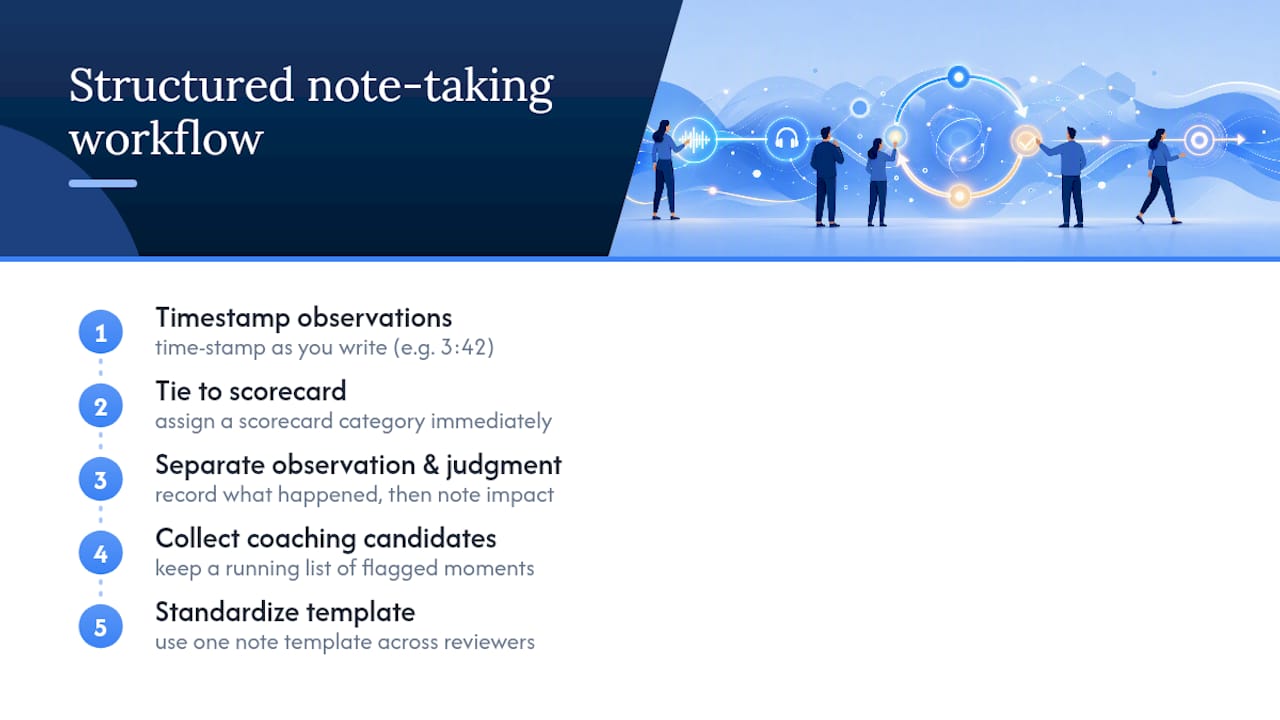
Separate observation from judgment in your notes. Write what happened first (“agent asked three closed-ended questions in a row”), then, if needed, a brief note on impact (“seller’s responses got shorter each time”). Mixing the two makes it harder to defend a score later or to spot patterns across many calls from the same agent.
Keep a running list of coaching candidates, not a single pick, during your pass through the call. You’ll often notice more than one moment worth flagging; you can narrow it to the single most important one when you sit down to write the coaching action. Finally, standardize your note template across reviewers. If one manager jots freeform paragraphs and another uses shorthand codes, calibration conversations become a translation exercise instead of a discussion about the actual call.
What Privacy and Legal Rules Apply to Recorded Call Reviews?
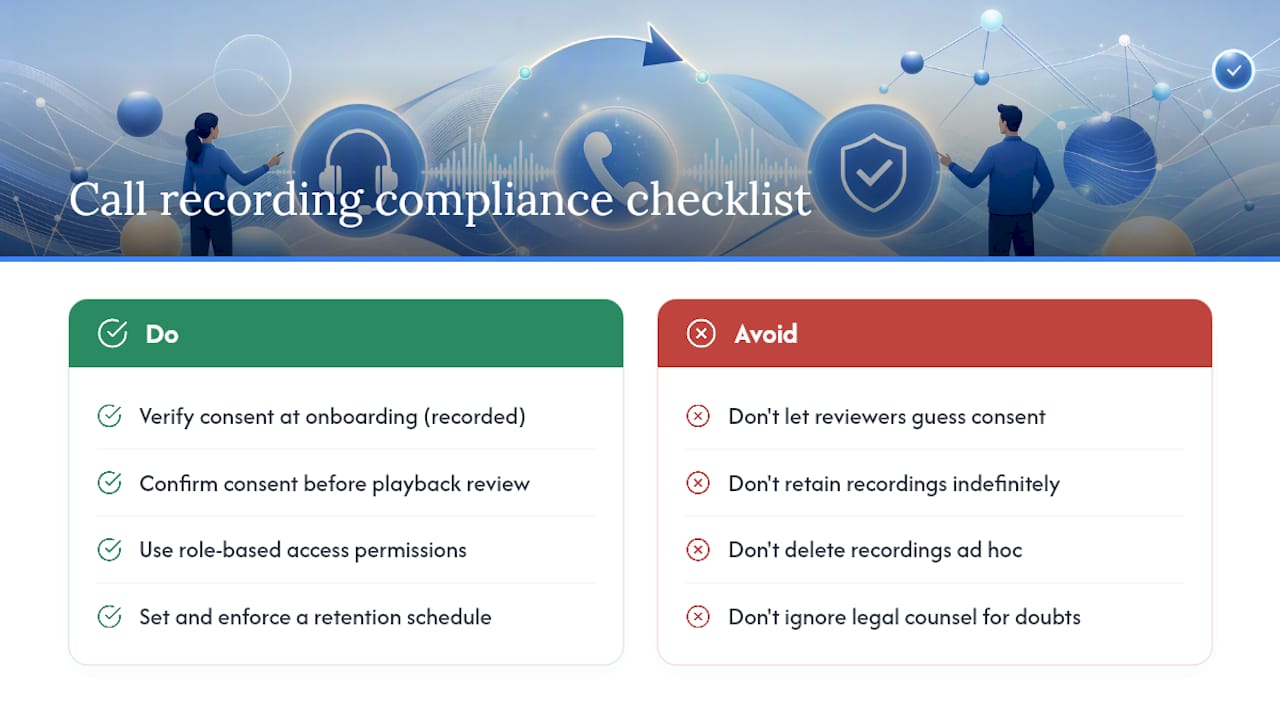
Recording and reviewing calls touches real legal exposure, and the rules vary depending on where your callers and agents are located. Many states require one-party or two-party consent before a call can be recorded at all, and reviewing a call that was recorded without proper consent can create liability regardless of how good your QA process is.
Build consent verification into onboarding, not into your review workflow. By the time a call reaches playback review, consent should already be a settled fact, confirmed by a recorded disclosure statement or documented opt-in, not something a reviewer has to guess about mid session.
Access controls matter as much as consent. Recordings involving sensitive personal circumstances, a seller going through divorce, a family managing a probate estate, deserve tighter access restrictions than routine calls. Role-based permissions that limit who can open, export, or share a recording aren’t just good practice; they reduce the chance that sensitive audio ends up somewhere it shouldn’t.
Set a retention policy and stick to it. Recordings kept indefinitely become a growing liability with no added coaching value past a certain point, usually a few months for most QA purposes. Document your retention schedule and apply it consistently rather than deleting recordings on an ad hoc basis, which can look selective if a dispute ever arises. When in doubt about a specific jurisdiction’s consent or retention requirements, that’s a conversation for legal counsel, not a guess based on what a competitor does.
Why Does Playback Sometimes Fail to Work, and How Do You Fix It?
Playback problems tend to fall into a short list of repeat offenders, and most have straightforward fixes once you know what you’re looking at.
Audio and transcript desync is the most common complaint. A transcript that drifts out of alignment with the audio, often worsening the longer the call runs, usually points to a processing issue on longer files or inconsistent bitrate on the original recording. Reprocessing the file or checking your platform’s supported audio format list typically resolves it.
Buffering or slow jump-to-timestamp response often comes down to how the platform streams audio. Platforms that support byte-range requests, letting a player pull just the segment you clicked instead of the whole file, jump instantly; ones that don’t will lag every time you click a timestamp, as technical documentation on range requests explains.
Missing recordings are usually a storage or permissions issue, not a deleted file. Check whether the recording landed in the expected storage location (platform-native storage versus an external bucket like Amazon S3) and whether your account role has access to that storage path before assuming the call was lost.
Clip exports that won’t open in other tools often trace back to a codec mismatch. Standardize on one export format across your team so clips shared in coaching notes or CRM records play reliably everywhere, not just inside the platform that generated them.
How Should Call Playback Connect to Your CRM and QA Stack?
A playback review that lives only inside your recording platform loses most of its value the moment the reviewer closes the tab. The score, the clip, and the coaching note need to travel with the lead record, not sit in a separate system nobody checks during the next call.
At minimum, your scorecard results should sync to the same CRM record where you track lead status, whether that seller is pre-foreclosure, probate, or a tired landlord who’s gone quiet. That connection lets you correlate call quality with actual outcomes: did the calls scoring low on discovery questions also convert fewer leads to appointments? You can’t answer that without linking the two systems.
Timestamped clips belong in the coaching note attached to the agent’s record, not buried in a separate playback tool. When a manager pulls up an agent’s file three weeks later for a performance conversation, the clip and the score should be sitting right there next to the CRM’s own lead qualification data, not requiring a separate login to find.
Reporting dashboards that pull from both systems tend to catch patterns single-system reviews miss, a rep who scores fine on individual calls but consistently loses leads at the same pipeline stage, for instance. That kind of correlation is where playback review stops being a compliance exercise and starts actually improving close rates.
How Do You Train Reviewers to Score Consistently?
Two reviewers scoring the same call and landing five points apart isn’t a scorecard problem, it’s a training problem. Bias and inconsistency creep in through vague criteria, personal pet peeves, and reviewers who’ve never compared notes with anyone else.
Run calibration sessions before reviewers ever score independently. Have every reviewer score the same three to five calls, then meet to compare results and argue out the differences. Structured calibration sessions surface exactly where your rubric’s language is too loose, usually on subjective categories like tone or rapport, long before those gaps show up as agent complaints.
Watch for common bias patterns specifically. Recency bias, where a reviewer’s judgment of an early moment gets colored by how the call ended, is common enough that some QA teams score sections in isolation rather than as one continuous impression. Halo effect, giving a generally likable agent the benefit of the doubt on borderline calls, is harder to catch and usually requires a second reviewer’s blind score for comparison.
Rotate calibration calls regularly, not just once at rollout. Rubrics drift as new call scenarios come up that the original criteria didn’t anticipate, and reviewers who calibrated a year ago on outbound scripts may score today’s inbound retention calls completely differently without a refresh. Track inter-rater agreement over time as a metric in its own right; a team where scores stay tightly clustered across reviewers has a QA program worth trusting.
How Do You Review Multi-Party Calls With Overlapping Speech?
Three-way calls, conference lines with a spouse or co-owner on the line, and calls where an agent’s supervisor jumps in mid-conversation break most standard review workflows built around a simple two-speaker transcript.
Speaker diarization tools struggle most with overlapping speech, moments where two people talk at once. Transcripts often garble these segments or attribute them to the wrong speaker entirely. Treat any diarization output during an overlap as a starting guess, not a fact, and verify by ear before scoring anything that happened in that window.
Score multi-party calls against a modified rubric, not the standard one. Discovery and objection handling criteria built for a single seller conversation don’t translate cleanly when a second decision-maker, an adult child helping an aging parent sell, for example, is also on the line asking questions. Note which speaker each score point applies to, since an agent might handle the primary seller well while missing cues from a co-owner entirely.
Clip selection matters more on multi-party calls than single-speaker ones. A 15-second clip that made sense in a two-person call often needs 30 to 45 seconds on a three-way call just to establish who’s speaking and why the moment matters. Longer context beats a tighter clip when overlapping voices are involved.
When Is Playback Review Alone Not Enough?
Playback review fails most often not because the tool is bad, but because the process around it is weak. Scoring 1 to 3 percent of calls and calling it quality assurance is the biggest trap, that sample size tells you almost nothing about your actual call quality, only about the handful of calls you happened to pick.
Automating a vague rubric is the second trap. If two reviewers can’t agree on what “good rapport” means, handing that same undefined standard to an AI scoring engine just automates the disagreement at scale. Fix the rubric’s language before you fix the tooling.
Pilot on one high-risk channel first, then expand once calibration holds. And never make agent visibility optional. A team that hides scores from the people being scored builds resentment, not improvement.
How ClosersLeague Turns Playback Findings Into Practice
Every playback review eventually surfaces the same pattern: a specific moment, an objection handled poorly, a tone that missed the seller’s stress, a disclosure rushed, that keeps costing deals. Knowing the problem is easy. Getting an agent enough reps to fix it before the next call is the part most teams skip.
ClosersLeague builds AI roleplay sessions around exactly those flagged moments. Instead of generic sales training, agents rehearse the specific seller scenario, pre-foreclosure, probate, a tired landlord who’s stopped answering, that their scorecard flagged as weak, and get scored again immediately. That closes the loop between review and improvement in days instead of the weeks it usually takes to schedule shadowing or role-play with a manager.
Scorecards, leaderboards, and objection drills inside the platform mirror the same categories your call playback review already tracks, so the practice reps map directly to what your recordings show needs work. If your team is ready to stop letting playback findings sit in a spreadsheet, [start a ClosersLeague trial](https://closersleague.com/real-estate-cold calling-practice/) and see how many reps it takes to close the gap your last review surfaced.
Sources
- Call Center Quality Assurance: Complete Guide + Checklist (2026)
- You’re Reviewing 3% of Your Calls. That’s Not QA. That’s a Coin Flip
- Call Monitoring: Best Practices and a Free Call QA Form – Kaizo
- Review recorded conversations between agents and customers using Connect Customer – Amazon Connect
FAQ
What Is a Call Playback Review?
A call playback review is the process of listening to a recorded phone call, scoring it against a defined rubric, and using specific timestamped moments to coach the agent on exactly what to change.
How Many Calls Should You Review Per Agent Each Week?
Sales teams commonly review a few calls per agent each week, typically including a win, a loss, and a stalled deal, while compliance-sensitive teams should review any call that triggers a flagged rule regardless of weekly count.
What Percentage of Calls Does Manual QA Typically Cover?
Manual QA programs typically cover only 1 to 3 percent of total call volume, which most QA leaders consider too small a sample to draw reliable conclusions.
How Do You Calibrate Human Reviewers With AI Scoring?
Run an overlap period where both human reviewers and the AI system score the same batch of calls, then compare and reconcile any scoring differences before relying on automated results at scale, a practice detailed in industry QA analysis.
Can Practice Sessions Fix Behaviors Flagged in Playback Review?
Yes. Platforms like ClosersLeague let agents rehearse the exact objection type or seller scenario a playback review flagged, through AI roleplay, so the fix gets practiced before the next real call instead of just discussed after the fact.